Fix ForEach-Object -Parallel when passing in script block variable - #16564
Conversation
…owerShell.cs

Co-authored-by: Ilya <darpa@yandex.ru>
…gin/PowerShell into fix-foreachparallel-using
|
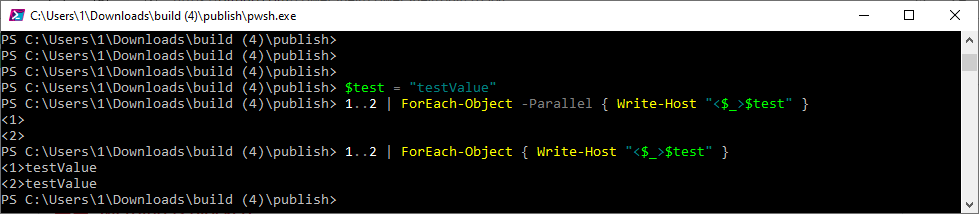
Could you please clarify why do we need to support |
|
Ilya (@iSazonov) The |
|
Do you mean If so, we got a very confusing UX. :-( |
|
?? This is all discussed in the RFC created for this feature. |
:-) Yes, and I objected to this |
|
Dongbo Wang (@daxian-dbw) Please review. |
|
Ilya (@iSazonov) |
|
Paul Higinbotham (@PaulHigin) Can you please also review #12378 and see if that can be closed after your fix. |
|
Dongbo Wang (@daxian-dbw) #12378 is a different issue. |
…owerShell#16564)

ForeEach-Object -Parallel using variable processing walks the script block AST to determine if the using variable was defined in the current scope, and does this by tracking the number of 'ForEach-Object -Parallel' commands in the call chain.
However, the provided script block is different, depending on whether it is passed in as a variable or via parameter binding.

$myScript = '"Hello!"'
1 | ForEach-Object -Parallel ([scriptblock]::Create($myScript))
# Script block Ast does not contain the 'ForEach-Object' command in the call chain

1 | ForEach-Object -Parallel { "Hello!" }
# Script block Ast does contain the 'ForEach-Object' command in the call chain

This change takes into account the two forms of script blocks
|
🎉 Handy links: |
|
@PowerShell/powershell-maintainers Allow some bake time and reconsider to verify that this is stable. |
|
Travis Plunk (@TravisEz13) Just to clarify this one was actually a regression (worked in 7.1.5, broke in 7.2, thank you Jordan Borean (@jborean93)). Unsure if that was discussed in the meeting but if not, it may be worth another pass. |
|
The progressive changes include not only the regression, but also new behavior. So I feel backporting this to LTS branches is risky, and that we should at least wait for it to bake longer in preview versions. |
|
We should reconsider backporting this as it appears to be affecting users of 7.2.x. |
|
/backport to release/v7.2.6 |
|
Started backporting to release/v7.2.6: https://github.com/PowerShell/PowerShell/actions/runs/2784832290
|

|
Aditya Patwardhan (@adityapatwardhan) backporting to release/v7.2.6 failed, the patch most likely resulted in conflicts: $ git am --3way --ignore-whitespace --keep-non-patch changes.patch
Applying: First try at fix
Applying: Fix scope function to correctly account for provided script block type.
Applying: Fix tests
Applying: Update src/System.Management.Automation/engine/runtime/ScriptBlockToPowerShell.cs
Applying: PR comments
.git/rebase-apply/patch:26: trailing whitespace.
warning: 1 line adds whitespace errors.
Using index info to reconstruct a base tree...
M src/System.Management.Automation/engine/runtime/ScriptBlockToPowerShell.cs
Falling back to patching base and 3-way merge...
Auto-merging src/System.Management.Automation/engine/runtime/ScriptBlockToPowerShell.cs
CONFLICT (content): Merge conflict in src/System.Management.Automation/engine/runtime/ScriptBlockToPowerShell.cs
error: Failed to merge in the changes.
hint: Use 'git am --show-current-patch=diff' to see the failed patch
Patch failed at 0005 PR comments
When you have resolved this problem, run "git am --continue".
If you prefer to skip this patch, run "git am --skip" instead.
To restore the original branch and stop patching, run "git am --abort".
Error: The process '/usr/bin/git' failed with exit code 128Please backport manually! |
|
Aditya Patwardhan (@adityapatwardhan) Friendly ping! |
|
This is in the backlog.. Currently working on fixing the build break in 7.2.6 |
|
/backport to release/v7.2.6 |
1 similar comment
|
/backport to release/v7.2.6 |
…owerShell#16564)

ForeEach-Object -Parallel using variable processing walks the script block AST to determine if the using variable was defined in the current scope, and does this by tracking the number of 'ForEach-Object -Parallel' commands in the call chain.
However, the provided script block is different, depending on whether it is passed in as a variable or via parameter binding.

$myScript = '"Hello!"'
1 | ForEach-Object -Parallel ([scriptblock]::Create($myScript))
# Script block Ast does not contain the 'ForEach-Object' command in the call chain

1 | ForEach-Object -Parallel { "Hello!" }
# Script block Ast does contain the 'ForEach-Object' command in the call chain

This change takes into account the two forms of script blocks
|
🎉 Handy links: |
…owerShell#16564)

ForeEach-Object -Parallel using variable processing walks the script block AST to determine if the using variable was defined in the current scope, and does this by tracking the number of 'ForEach-Object -Parallel' commands in the call chain.
However, the provided script block is different, depending on whether it is passed in as a variable or via parameter binding.

$myScript = '"Hello!"'
1 | ForEach-Object -Parallel ([scriptblock]::Create($myScript))
# Script block Ast does not contain the 'ForEach-Object' command in the call chain

1 | ForEach-Object -Parallel { "Hello!" }
# Script block Ast does contain the 'ForEach-Object' command in the call chain

This change takes into account the two forms of script blocks
PR Summary
This change fixes #16445, where using variables were not being evaluated correctly when the -Parallel script block is passed in as a variable.
PR Context
ForeEach-Object -Parallel using variable processing walks the script block AST to determine if the using variable was defined in the current scope, and does this by tracking the number of 'ForEach-Object -Parallel' commands in the call chain.
However, the provided script block is different, depending on whether it is passed in as a variable or via parameter binding.
This change takes into account the two forms of script blocks
PR Checklist
.h,.cpp,.cs,.ps1and.psm1files have the correct copyright headerWIP:or[ WIP ]to the beginning of the title (theWIPbot will keep its status check atPendingwhile the prefix is present) and remove the prefix when the PR is ready.(which runs in a different PS Host).