/*
* GNU AGPL-3.0 License
*
* Copyright (c) 2021 - present core.ai . All rights reserved.
* Original work Copyright (c) 2013 - 2021 Adobe Systems Incorporated. All rights reserved.
*
* This program is free software: you can redistribute it and/or modify it
* under the terms of the GNU Affero General Public License as published by
* the Free Software Foundation, either version 3 of the License, or
* (at your option) any later version.
*
* This program is distributed in the hope that it will be useful, but WITHOUT
* ANY WARRANTY; without even the implied warranty of MERCHANTABILITY or
* FITNESS FOR A PARTICULAR PURPOSE. See the GNU Affero General Public License
* for more details.
*
* You should have received a copy of the GNU Affero General Public License
* along with this program. If not, see https://opensource.org/licenses/AGPL-3.0.
*
*/
/*jslint regexp: true */
// @INCLUDE_IN_API_DOCS
/**
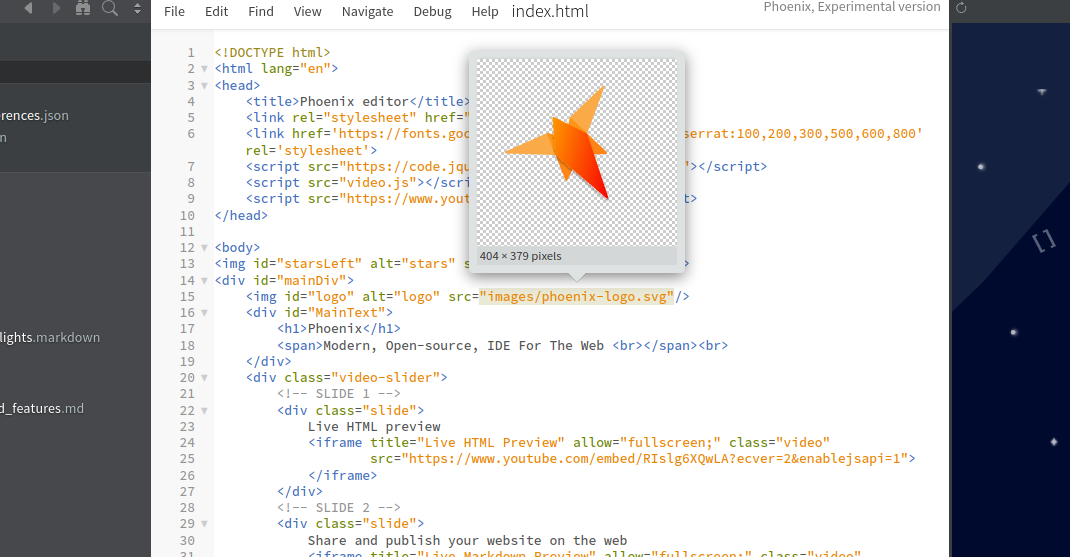
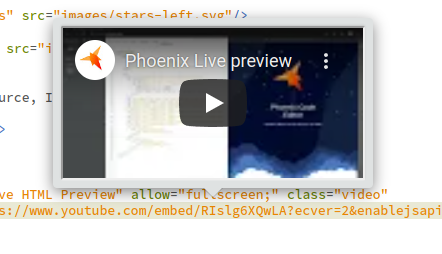
* QuickViewManager provides support to add interactive preview popups on hover over the main editors.
* Extensions can register to provide previews with `QuickViewManager.registerQuickViewProvider` API.
*  *
*  *
* ### See Related: SelectionViewManager
* [features/SelectionViewManager](https://github.com/phcode-dev/phoenix/wiki/SelectionViewManager-API) is similar to
* QuickViewManager API.
* * SelectionViews popup only once user selects a text by mouse or hover over a region with text selection.
* * Quickviews popup on mouse hover.
*
*
* ### See Related: SelectionViewManager
* [features/SelectionViewManager](https://github.com/phcode-dev/phoenix/wiki/SelectionViewManager-API) is similar to
* QuickViewManager API.
* * SelectionViews popup only once user selects a text by mouse or hover over a region with text selection.
* * Quickviews popup on mouse hover.
*  *
*
* ## Usage
* Lets build a "hello world" extension that displays "hello world" on hover over a text in the editor.
* In your extension file, add the following code:
*
* @example
* ```js
* const QuickViewManager = brackets.getModule("features/QuickViewManager");
* // replace `all` with language ID(Eg. javascript) if you want to restrict the preview to js files only.
* QuickViewManager.registerQuickViewProvider(exports, ["all"]);
*
* // provide a helpful name for the QuickView. This will be useful if you implement `filterQuickView` function or
* // have to debug the quick view.
* exports.QUICK_VIEW_NAME = "extension.someName";
* // now implement the getQuickView function that will be invoked when ever user hovers over a text in the editor.
* exports.getQuickView = function(editor, pos, token, line) {
* return new Promise((resolve, reject)=>{
* resolve({
* start: {line: pos.line, ch:token.start},
* end: {line: pos.line, ch:token.end},
* content: "
*
*
* ## Usage
* Lets build a "hello world" extension that displays "hello world" on hover over a text in the editor.
* In your extension file, add the following code:
*
* @example
* ```js
* const QuickViewManager = brackets.getModule("features/QuickViewManager");
* // replace `all` with language ID(Eg. javascript) if you want to restrict the preview to js files only.
* QuickViewManager.registerQuickViewProvider(exports, ["all"]);
*
* // provide a helpful name for the QuickView. This will be useful if you implement `filterQuickView` function or
* // have to debug the quick view.
* exports.QUICK_VIEW_NAME = "extension.someName";
* // now implement the getQuickView function that will be invoked when ever user hovers over a text in the editor.
* exports.getQuickView = function(editor, pos, token, line) {
* return new Promise((resolve, reject)=>{
* resolve({
* start: {line: pos.line, ch:token.start},
* end: {line: pos.line, ch:token.end},
* content: "hello world
"
* });
* });
* };
* // optional filter quick view function to handle multiple quick views
* exports.filterQuickView = function(popovers){
* // popovers will be an array of all popovers rendered by providers
* return popovers; // dont filter show everything in this case
* }
* ```
*
* ### How it works
* When QuickViewManager determines that the user intents to see QuickView on hover, `getQuickView` function on all
* registered QuickView providers are invoked to get the quick view popup. `getQuickView` should return a promise
* that resolves to the popup contents if the provider has a quick view. Else just reject the promise. If multiple
* providers returns QuickView, all of them are displayed stacked one by one. You can alter this behavior by
* providing a `filterQuickView` function in the provider where you can modify what previews will be shown.
* See detailed API docs for implementation details below:
*
* ## API
* ### registerQuickViewProvider
* Register a QuickView provider with this api.
*
* @example
* ```js
* // syntax
* QuickViewManager.registerQuickViewProvider(provider, supportedLanguages);
* ```
* The API requires two parameters:
* 1. `provider`: must implement a `getQuickView` function which will be invoked to get the preview. See API doc below.
* 1. `supportedLanguages`: An array of languages that the QuickView supports. If `["all"]` is supplied, then the
* QuickView will be invoked for all languages. Restrict to specific languages: Eg: `["javascript", "html", "php"]`
*
*
* @example
* ```js
* // to register a provider that will be invoked for all languages. where provider is any object that implements
* // a getQuickView function
* QuickViewManager.registerQuickViewProvider(provider, ["all"]);
*
* // to register a provider that will be invoked for specific languages
* QuickViewManager.registerQuickViewProvider(provider, ["javascript", "html", "php"]);
* ```
*
* ### removeQuickViewProvider
* Removes a registered QuickView provider. The API takes the same arguments as `registerQuickViewProvider`.
*
* @example
* ```js
* // syntax
* QuickViewManager.removeQuickViewProvider(provider, supportedLanguages);
* // Example
* QuickViewManager.removeQuickViewProvider(provider, ["javascript", "html"]);
* ```
*
* ### getQuickView
* Each provider must implement the `getQuickView` function that returns a promise. The promise either resolves with
* the quick view details object(described below) or rejects if there is no preview for the position.
*
* @example
* ```js
* // function signature
* provider.getQuickView = function(editor, pos, token, line) {
* return new Promise((resolve, reject)=>{
* resolve({
* start: {line: pos.line, ch:token.start},
* end: {line: pos.line, ch:token.end},
* content: "hello world
",
* editsDoc: false // this is optional if the quick view edits the current doc
* });
* });
* };
* ```
*
* #### parameters
* The function will be called with the following arguments:
* 1. `editor` - The editor over which the user hovers the mouse cursor.
* 1. `pos` - the cursor position over which the user hovers.
* 1. `token` - hovered token details
* 1. `line` - the full line text as string.
*
* #### return types
* The promise returned should resolve to an object with the following contents:
* 1. `start` : Indicates the start cursor position from which the quick view is valid.
* 1. `end` : Indicates the end cursor position to which the quick view is valid. These are generally used to highlight
* the hovered section of the text in the editor.
* 1. `content`: Either `HTML` as text, a `DOM Node` or a `Jquery Element`.
* 1. `editsDoc`: Optional, set to true if the quick view can edit the active document.
*
* #### Modifying the QuickView content after resolving `getQuickView` promise
* Some advanced/interactive extensions may need to do dom operations on the quick view content.
* In such cases, it is advised to return a domNode/Jquery element as content in `getQuickView`. Event Handlers
* or further dom manipulations can be done on the returned content element.
* The Quick view may be dismissed at any time, so be sure to check if the DOM Node is visible in the editor before
* performing any operations.
*
* #### Considerations
* 1. QuickView won't be displayed till all provider promises are settled. To improve performance, if your QuickView
* handler takes time to resolve the QuickView, resolve a dummy quick once you are sure that a QuickView needs
* to be shown to the user. The div contents can be later updated as and when more details are available.
* 1. Note that the QuickView could be hidden/removed any time by the QuickViewManager.
* 1. If multiple providers returns a valid popup, all of them are displayed except if the `filterQuickView` modifies
* the quick view render list. Note that `filterQuickView` is called only for those providers that
* provided a quick view.
*
* ### filterQuickView
* Each provider can optionally implement the `filterQuickView` function to control what among the available
* quick views should be rendered if multiple providers responded with a QuickView. The function will be called
* once all `getQuickView` providers provided a valid preview object.
*
* @example
* ```js
* // function signature
* provider.filterQuickView = function(popovers) {
* for(let popover of popovers){
* // here if we see that a quick view with name `exclusiveQuickView` is present, then we only show that
* // QuickView. popover.providerInfo object holds details of what provider provided the quick view.
* if(popover.providerInfo.provider.QUICK_VIEW_NAME === "exclusiveQuickView"){
* return [popover]
* }
* }
* // if nothing is returned, then the `popovers` param will be used to show popover
* };
* ```
*
* #### parameter
* The function will be called with the `popovers` parameter which is an array of popover objects that was returned
* by `getQuickView` function of all succeeded providers. Details of each provider that created a popover
* will be present in `popovers[i].providerInfo` object.
*
* #### return
* An array of popovers that needs to be rendered, or nothing(to render the original popover parameter as is).
* @module features/QuickViewManager
*/
define(function (require, exports, module) {
// Brackets modules
const CommandManager = require("command/CommandManager"),
Commands = require("command/Commands"),
EditorManager = require("editor/EditorManager"),
Menus = require("command/Menus"),
PreferencesManager = require("preferences/PreferencesManager"),
Strings = require("strings"),
ViewUtils = require("utils/ViewUtils"),
AppInit = require("utils/AppInit"),
WorkspaceManager = require("view/WorkspaceManager"),
EventDispatcher = require("utils/EventDispatcher"),
ProviderRegistrationHandler = require("features/PriorityBasedRegistration").RegistrationHandler;
EventDispatcher.makeEventDispatcher(exports);
const _EVENT_POPUP_CONTENT_MUTATED = "_popupContentMutated";
// Create a new MutationObserver instance
const observer = new MutationObserver(mutations => {
for (let mutation of mutations) {
if (mutation.type === 'childList' || mutation.type === 'subtree') {
exports.trigger(_EVENT_POPUP_CONTENT_MUTATED, mutations);
break; // Optional: Break after the first change if only one change is needed
}
}
});
const previewContainerHTML = '';
const _providerRegistrationHandler = new ProviderRegistrationHandler(),
registerQuickViewProvider = _providerRegistrationHandler.registerProvider.bind(_providerRegistrationHandler),
removeQuickViewProvider = _providerRegistrationHandler.removeProvider.bind(_providerRegistrationHandler);
function _getQuickViewProviders(editor, pos) {
let language = editor.getLanguageForPosition(pos);
return _providerRegistrationHandler.getProvidersForLanguageId(language.getId());
}
let enabled, // Only show preview if true
prefs = null, // Preferences
$previewContainer, // Preview container
$previewContent, // Preview content holder
_currentMousePos,
animationRequest,
quickViewLocked = false;
// Constants
const CMD_ENABLE_QUICK_VIEW = "view.enableQuickView",
QUICK_VIEW_EDITOR_MARKER = 'quickViewMark',
// Time (ms) mouse must remain over a provider's matched text before popover appears
HOVER_DELAY = 350,
// Pointer height, used to shift popover above pointer (plus a little bit of space)
POINTER_HEIGHT = 10,
POPOVER_HORZ_MARGIN = 5; // Horizontal margin
prefs = PreferencesManager.getExtensionPrefs("quickview");
prefs.definePreference("enabled", "boolean", true, {
description: Strings.DESCRIPTION_QUICK_VIEW_ENABLED
});
/**
* There are three states for this var:getToken
* 1. If null, there is no provider result for the given mouse position.
* 2. If non-null, and visible==true, there is a popover currently showing.
* 3. If non-null, but visible==false, we're waiting for HOVER_DELAY, which
* is tracked by hoverTimer. The state changes to visible==true as soon as
* there is a provider. If the mouse moves before then, timer is restarted.
* @typedef {Object} PopoverState
* @property {boolean} visible - Whether the popover is visible.
* @property {!Editor} editor - The editor instance associated with the popover.
* @property {number} hoverTimer - The token returned by setTimeout().
* @property {!{line: number, ch: number}} start - Start of the matched text range.
* @property {!{line: number, ch: number}} end - End of the matched text range.
* @property {!string} content - HTML content to display in the popover.
* @property {number} xpos - X-coordinate of the center of the popover.
* @property {number} ytop - Y-coordinate of the top of the matched text when popover is above the text.
* @property {number} ybot - Y-coordinate of the bottom of the matched text when popover is below the text.
* @property {?CodeMirror.TextMarker} marker - The text marker; only set once `visible` is `true`.
* @private
*/
let popoverState = null;
// Popover widget management ----------------------------------------------
/**
* Cancels whatever popoverState was currently pending and sets it back to null. If the popover was visible,
* hides it; if the popover was invisible and still pending, cancels hoverTimer so it will never be shown.
* @private
*/
function hidePreview() {
if (!popoverState) {
return;
}
if (popoverState.visible) {
popoverState.marker.clear();
$previewContent.empty();
$previewContainer.hide();
$previewContainer.removeClass("active");
if(EditorManager.getActiveEditor()){
EditorManager.getActiveEditor().focus();
}
}
mouseInPreviewContainer = false;
unlockQuickView();
window.clearTimeout(popoverState.hoverTimer);
popoverState = null;
}
function positionPreview(editor, xpos, ypos, ybot) {
if ($previewContent.find("#quick-view-popover-root").is(':empty')){
hidePreview();
return;
}
let previewWidth = $previewContainer.outerWidth(),
top = ypos - $previewContainer.outerHeight() - POINTER_HEIGHT,
left = xpos - previewWidth / 2,
elementRect = {
top: top,
left: left - POPOVER_HORZ_MARGIN,
height: $previewContainer.outerHeight() + POINTER_HEIGHT,
width: previewWidth + 2 * POPOVER_HORZ_MARGIN
},
clip = ViewUtils.getElementClipSize($(editor.getRootElement()), elementRect);
// Prevent horizontal clipping
if (clip.left > 0) {
left += clip.left;
} else if (clip.right > 0) {
left -= clip.right;
}
// If clipped on top, flip popover below line
if (clip.top > 0) {
top = ybot + POINTER_HEIGHT;
$previewContainer
.removeClass("preview-bubble-above")
.addClass("preview-bubble-below");
} else {
$previewContainer
.removeClass("preview-bubble-below")
.addClass("preview-bubble-above");
}
$previewContainer
.css({
left: left,
top: top
})
.addClass("active");
}
// Preview hide/show logic ------------------------------------------------
function _isResultBeforePopoverStart(editor, popover, result){
if(!popover.start){
return true;
}
return editor.indexFromPos(result.start) < editor.indexFromPos(popover.start);
}
function _isResultAfterPopoverEnd(editor, popover, result){
if(!popover.end){
return true;
}
return editor.indexFromPos(popover.start) > editor.indexFromPos(result.end);
}
function _createPopoverState(editor, popoverResults) {
if (popoverResults && popoverResults.length) {
let popover = {
content: $("")
};
// Each provider return popover { start, end, content}
for(let i=0; i`).append(result.content));
}
let startCoord = editor.charCoords(popover.start),
endCoord = editor.charCoords(popover.end);
popover.xpos = (endCoord.left - startCoord.left) / 2 + startCoord.left;
if(endCoord.left{
if(!popoverState || !editor){
return;
}
positionPreview(editor, popoverState.xpos, popoverState.ytop, popoverState.ybot);
});
}
}
let currentQueryID = 0;
async function showPreview(editor) {
let token;
// Figure out which editor we are over
if (!editor) {
editor = EditorManager.getHoveredEditor(_currentMousePos);
}
if (!editor) {
hidePreview();
return;
}
// Find char mouse is over
let pos = editor.coordsChar({left: _currentMousePos.clientX, top: _currentMousePos.clientY});
// No preview if mouse is past last char on line
if (pos.ch >= editor.document.getLine(pos.line).length) {
return;
}
// Query providers and append to popoverState
token = editor.getToken(pos);
currentQueryID++;
let savedQueryId = currentQueryID;
popoverState = await queryPreviewProviders(editor, pos, token);
if(savedQueryId === currentQueryID){
// this is to prevent race conditions. For Eg., if the preview provider takes time to generate a preview,
// another query might have happened while the last query is still in progress. So we only render the most
// recent QueryID
_renderPreview(editor);
}
}
function _isMouseFarFromPopup() {
const previewRect = $previewContainer[0].getBoundingClientRect();
const docRect = {
height: $(document).height(),
width: $(document).width()
};
const thresholdPercent = 5;
function _isDistanceExceedThreshold(smaller, larger, total, threshold) {
return ((larger - smaller)/total)*100 > threshold;
}
let x= _currentMousePos.clientX, y=_currentMousePos.clientY;
if((xpreviewRect.right && _isDistanceExceedThreshold(previewRect.right, x, docRect.width, thresholdPercent))
||(ypreviewRect.bottom && _isDistanceExceedThreshold(previewRect.bottom, y, docRect.height, thresholdPercent))){
return true;
}
return false;
}
function processMouseMove() {
animationRequest = null;
if (mouseInPreviewContainer || quickViewLocked) {
return;
}
let editor = null;
if (popoverState && popoverState.visible) {
// Only figure out which editor we are over when there is already a popover
// showing (otherwise wait until after delay to minimize processing)
editor = EditorManager.getHoveredEditor(_currentMousePos);
if (editor) {
// Find char mouse is over
let pos = editor.coordsChar({left: _currentMousePos.clientX, top: _currentMousePos.clientY});
if (popoverState.start && popoverState.end &&
editor.posWithinRange(pos, popoverState.start, popoverState.end, true) &&
(pos.ch < editor.document.getLine(pos.line).length)) {
// That one's still relevant - nothing more to do
// Note: posWithinRange() includes mouse past end of line, so need to check for that case
return;
}
if(_isMouseFarFromPopup()){
hidePreview();
return;
}
}
}
popoverState = popoverState || {};
// Set timer to scan and show. This will get cancelled (in hidePreview())
// if mouse movement rendered this popover inapplicable before timer fires.
// When showing "immediately", still use setTimeout() to make this async
// so we return from this mousemove event handler ASAP.
clearTimeout(popoverState.hoverTimer);
popoverState.hoverTimer = window.setTimeout(function () {
if(!mouseInPreviewContainer && !quickViewLocked){
hidePreview();
popoverState = {};
showPreview(editor);
}
}, HOVER_DELAY);
}
function handleMouseMove(event) {
// Keep track of mouse position
_currentMousePos = {
clientX: event.clientX,
clientY: event.clientY
};
if (!enabled || quickViewLocked
|| $previewContainer[0].contains(window.document.activeElement)) {
// activeElement check as, if the popup has an active element, say a text input, user may
// move the mouse outside popup to type in the input, in which case we should not close popup.
return;
}
if (event.buttons !== 0 && !mouseInPreviewContainer) {
// Button is down - don't show popovers while dragging
hidePreview();
return;
}
// Prevent duplicate animation frame requests
if (!animationRequest) {
animationRequest = window.requestAnimationFrame(processMouseMove);
}
}
function docChanged() {
if(popoverState && !popoverState.editsDoc){
hidePreview();
}
}
function onActiveEditorChange(event, current, previous) {
// Hide preview when editor changes
hidePreview();
if (previous && previous.document) {
previous.document.off("change", docChanged);
}
if (current && current.document) {
current.document.on("change", docChanged);
}
}
// Menu command handlers
function updateMenuItemCheckmark() {
CommandManager.get(CMD_ENABLE_QUICK_VIEW).setChecked(enabled);
}
let mouseInPreviewContainer = false;
function mouseOut(_evt) {
setTimeout(()=>{
if(mouseInPreviewContainer || $previewContainer[0].contains(_evt.toElement) || quickViewLocked){
return;
}
hidePreview();
}, HOVER_DELAY);
}
function _mouseEnteredPreviewContainer() {
mouseInPreviewContainer = true;
}
function _mouseExitedPreviewContainer() {
mouseInPreviewContainer = false;
}
function setEnabled(_enabled, doNotSave) {
if (enabled !== _enabled) {
enabled = _enabled;
let editorHolder = $("#editor-holder")[0];
let previewContainer = $previewContainer[0];
if (enabled) {
// Note: listening to "scroll" also catches text edits, which bubble a scroll
// event up from the hidden text area. This means
// we auto-hide on text edit, which is probably actually a good thing.
editorHolder.addEventListener("mousemove", handleMouseMove, true);
editorHolder.addEventListener("scroll", hidePreview, true);
editorHolder.addEventListener("mouseout", mouseOut, true);
previewContainer.addEventListener("mouseover", _mouseEnteredPreviewContainer, true);
previewContainer.addEventListener("mouseout", _mouseExitedPreviewContainer, true);
// Setup doc "change" listener
onActiveEditorChange(null, EditorManager.getActiveEditor(), null);
EditorManager.on("activeEditorChange", onActiveEditorChange);
} else {
editorHolder.removeEventListener("mousemove", handleMouseMove, true);
editorHolder.removeEventListener("scroll", hidePreview, true);
editorHolder.removeEventListener("mouseout", mouseOut, true);
previewContainer.removeEventListener("mouseover", _mouseEnteredPreviewContainer, true);
previewContainer.removeEventListener("mouseout", _mouseExitedPreviewContainer, true);
// Cleanup doc "change" listener
onActiveEditorChange(null, null, EditorManager.getActiveEditor());
EditorManager.off("activeEditorChange", onActiveEditorChange);
hidePreview();
}
if (!doNotSave) {
prefs.set("enabled", enabled);
prefs.save();
}
}
// Always update the checkmark, even if the enabled flag hasn't changed.
updateMenuItemCheckmark();
}
function toggleEnableQuickView() {
let enableQuickView = !enabled;
if(!enableQuickView){
unlockQuickView();
}
setEnabled(enableQuickView);
}
function _forceShow(popover) {
hidePreview();
_currentMousePos = {
clientX: popover.xpos,
clientY: Math.floor((popover.ybot + popover.ytop) / 2)
};
popoverState = popover;
_renderPreview(popover.editor);
}
function _handleEscapeKeyEvent(event) {
if(isQuickViewShown()){
hidePreview();
event.preventDefault();
event.stopPropagation();
return true;
}
return false;
}
AppInit.appReady(function () {
// Create the preview container
$previewContainer = $(previewContainerHTML).appendTo($("body"));
$previewContent = $previewContainer.find(".preview-content");
observer.observe($previewContent[0], {
childList: true, // Observe direct children
subtree: true // And lower descendants too
});
// Register command
// Insert menu at specific pos since this may load before OR after code folding extension
CommandManager.register(Strings.CMD_ENABLE_QUICK_VIEW, CMD_ENABLE_QUICK_VIEW, toggleEnableQuickView);
Menus.getMenu(Menus.AppMenuBar.VIEW_MENU).addMenuItem(
CMD_ENABLE_QUICK_VIEW, null, Menus.AFTER, Commands.VIEW_TOGGLE_INSPECTION);
// Setup initial UI state
setEnabled(prefs.get("enabled"), true);
prefs.on("change", "enabled", function () {
setEnabled(prefs.get("enabled"), true);
});
WorkspaceManager.addEscapeKeyEventHandler("quickView", _handleEscapeKeyEvent);
});
/**
* If quickview is displayed and visible on screen
* @return {boolean}
* @type {function}
*/
function isQuickViewShown() {
return (popoverState && popoverState.visible) || false;
}
/**
* locks the current QuickView if shown to be permanently displayed on screen till the `unlockQuickView` function
* is called or document changes.
*
* @type {function}
*/
function lockQuickView() {
if(isQuickViewShown()){
quickViewLocked = true;
}
}
/**
* unlocks the current QuickView locked by `lockQuickView` fucntion.
*
* @type {function}
*/
function unlockQuickView() {
quickViewLocked = false;
}
// For unit testing
exports._queryPreviewProviders = queryPreviewProviders;
exports._forceShow = _forceShow;
exports.registerQuickViewProvider = registerQuickViewProvider;
exports.removeQuickViewProvider = removeQuickViewProvider;
exports.isQuickViewShown = isQuickViewShown;
exports.lockQuickView = lockQuickView;
exports.unlockQuickView = unlockQuickView;
});